
There are several reasons that a business may want to merge it’s existing Facebook Pages. One of the most common reason tends to be that someone in the business created a Facebook Page in the ‘early days’ and it was completely forgotten about so a second page has been built.
Or, for example, a business decided to create a Facebook Page for each location, or sub-brand when they first joined the platform but now they’ve realised just how much work goes into posting content and social listening across multiple Social Media platforms let alone multiple Pages.
Either way, it can be confusing for customers to search for a company only to find multiple Facebook Pages. If a customer is looking to follow you or make an enquiry and they can’t work out which Page to engage with, then you risk them choosing neither.
Before you look to merge your Facebook Pages it’s important to understand that:
- Your Pages must have similar names.
- You Pages must have the same physical location and address.
- You’re not running any Ad Campaigns from the Page that will be deleted.
If any of the above isn’t correct for you, Facebook won’t allow you to merge the pages. Where necessary, you can make the changes, such as updating the Page address, before requesting to merge.
If the Pages are too different to merge then you will need to consider deleting or unpublishing the second Page. Unfortunately, this will mean you lose your existing followers on that Page but you can share a post linking to the remaining Page before deletion to explain and encourage them to move over.
If you then want to increase your followers on the remaining Page, there are several ways to do so, including posting regular, quality content, utilising Stories and running Facebook ad campaigns.
What Happens When You Merge Facebook Pages?
When you merge your Facebook Pages you will combine your Followers and Check-Ins. One of the Facebook pages will be permanently deleted. It’s important to note that previous Posts, Reviews, Ratings and Photos from the merged Page will be lost Make sure you have copies of any content you want to keep.
It’s likely that you (or your existing followers) won’t notice much of a change from the remaining Page other than an increased following.
Five Simple Steps To Merging Facebook Pages
- Make sure you’re Admin or Owner of both pages.
- Visit facebook.com/pages/merge or go to your page general settings.
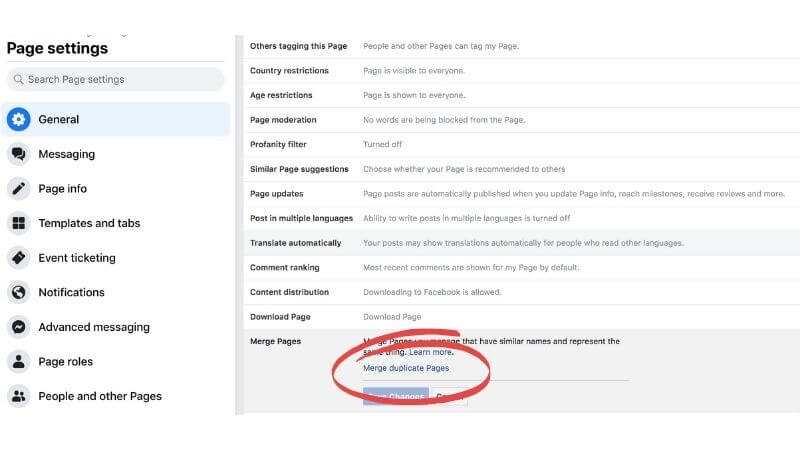
3. Select the two Pages that you want to merge.

4. Understand that this cannot be undone (!) You also may be asked to enter your password at this point.
5. Click Request Merge.

Once the merge is complete – this could take up to seven days – the followers from the now inactive merged Page will be notified.
This would be a good opportunity to share some refresher posts to your newly combined audience about who you are and what products or services you offer.
What if it doesn’t work?
If you get an error message when you try to complete the merge please follow the information Facebook gives you.
In the example below, the page locations are too far apart, it can also be that the names are too different. Whatever the case is Facebook will give you guidance in the error message as to what the issue is.
There is a possibility that you will see a message asking you to ‘request to merge your Pages’. If this happens Facebook will manually review your request and approve the merge if everything is in order.


Getting Started With Paid Social Media Advertising
If you've worked in Marketing you will have heard the phrase 'pay to play' at least once and unfortunately, this is the case when it comes to guaranteeing a significant...

Why Video Should Be Part Of Your Social Media Strategy
Statistics suggest that the average person will watch approximately 100 minutes of video content online daily in the next year. It, therefore, won’t come as a surprise...