Not only is the platform a great space to connect with friends and family, but it’s also a fully-fledged marketing tool for businesses. Facebook Pages, Groups and Ads have enabled businesses to reach and engage with their audiences for several years now, but, more recently, Facebook has gone one step further.
With the addition of Facebook Shops, Catalogues and Marketplace, Facebook and Instagram are arguable also a sales platform, allowing customers to complete their digital customer journey from conquest to customer all without leaving the app!
If businesses are looking to list and promote their products across Facebook and Instagram, the best place to start is to understand Facebook Commerce Manager.
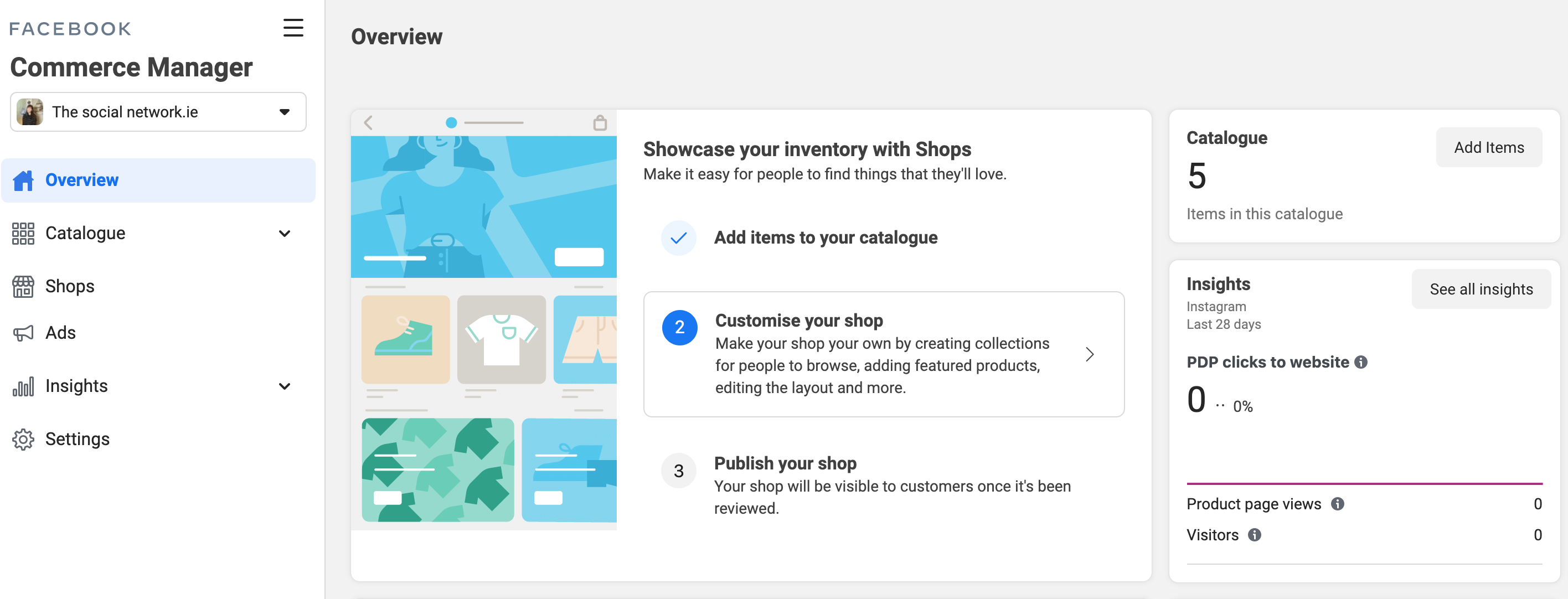
Commerce Manager is a set of tools within Facebook Business Manager designed to support businesses selling their products and generally managing their business across both Facebook and Instagram. Commerce Manager allows businesses to handle inventory, manage payments and conduct sales without leaving the platform.

Benefits of Facebook Commerce Manager
Social Media platforms can be hard to navigate unless you really know what you’re doing. Commerce Manager helps businesses manage all aspects of selling on Facebook and Instagram in one handy place.
There are many benefits to using Commerce Manager, including the ability for businesses to upload and manage their inventory, allowing them to keep track of their sales and therefore payment history.
Commerce Manager enables customers to checkout securely on the site and thus makes their customer journey safe and seamless – on a trusted platform. Facebook will support businesses in growing their exposure and sales via valuable customer insights and recommendations on how best to expand.
Collaborate with Colleagues
Depending on your business’s size, there may be multiple team members who need to coordinate around Commerce Manager. For example, your existing sales team – both on and offline and your Marketing department.
Sales Team
Whether you’re already selling online, via your website or third-party sites, or just offline, for now, it’s essential that the whole sales team has an understanding of your activity on Facebook.
Collaboration across the business, online and offline, is key. Facebook may also share valuable insights on customer demographics that could support sales via other channels.
Marketing Team
Just because Facebook is typically seen as a marketing platform for businesses doesn’t necessarily mean it’s the Social Media Manager who will be running Commerce Manager.
No matter who is involved in the business’s e-commerce side, the marketing department needs to know how they should raise awareness and promote your Facebook or Instagram Shop.
Customer Service Team
As above, several team members may need to be aligned with the activity on Commerce Manager even if they’re not actively working on the platform.
Those in charge of Customer Service must be aware of every aspect of the business both on and offline to ensure consistency across all channels.
e-Commerce Partners
If you currently manage your digital sales via a third-party e-commerce platform, then it’s worth researching if they integrate with Facebook Commerce Manager.
The most common platform that Facebook already works with is Shopify, but there are several others, and if yours isn’t on the initial list, Facebook is open to developing with additional partners.
By connecting your e-commerce platform to Facebook Catalogue Manager, you can set up an automated feed into Facebook and therefore only have to manage one platform at a time.
Facebook Business Manager
Facebook Business Manager incorporates several other tools within Facebook, such as Facebook Pages, Advertising Accounts and Tracking Pixels. Before you get too deep with setting up Commerce Manager, it’s recommended that you first set up a Business Manager Account and connect your Commerce Manager as it will help you manage your catalogue more efficiently.
Facebook Business Manager also allows businesses to add various User Roles within the business, all with different access levels, depending on their responsibilities.
Setting Up Facebook Commerce Manager
Before getting set up on Facebook Commerce Manager, it’s essential to understand the policies. Facebook aims to create a safe and respectable experience and therefore have policies to support both the seller and buyer. Businesses must comply with all relevant policies to continue to utilise Commerce Manager.
Facebook will monitor whether you’re adhering to their policies closely, and this will determine your rating. According to Facebook, the best way to maintain a good rating is to:
• Keep your inventory updated.
• Don’t forget to mark your orders as shipped.
• Provide valid tracking numbers and carriers.
• Ship orders within 3 business days.
• Ensure orders are delivered in the time frame promised.
• Respond to customers within 2 business days.
• Follow the Facebook return policy.
Not only will the above put you in Facebook’s good books, but happy customers equal repeat customers, so it’s a win-win! See the full detail on policies here.
What’s Next
Next, it’s recommended that you collate everything you need to get set up before you start.
This includes:
1. A business representatives name plus their National Insurance Number and Date of Birth for ID verification
2. Your business address (if you have one)
3. The category that best describes your business
4. Your business type and name
Finally, you will need additional details such as your bank account numbers, delivery times and costs.
These can, however, be edited under Settings at a later date if you’re unsure or anything changes. If you have a returns policy, then be sure to include this as well as contact information for your customer service department.

Utilise Facebook Advertising
Once you’re fully set up on Facebook Business Manager, and within that Commerce Manager, you will be able to list your stock organically in your ‘Shop’. If you’re looking to reach new audiences, or reengage with your website visitors, then consider assigning some marketing budget to Facebook and Instagram Ads.
Within Facebook Ads Manager, you will be able to run ‘Collection’ or ‘Carousel’ Ads that feature your Product Sets. Facebook Ads will allow your audience to browse your products within the Apps and drive awareness and engagement.
The beauty of using your catalogue to dynamically populate your Social Media Ads is that if you want to amend the image or price of a product, your Campaigns are automatically updated too – thus saving time and ensuring what your advertising is always accurate.
Whether you’re listing organically or via Facebook Ads, it’s essential that your stock photography is at a high standard and your product price and descriptions are accurate. If the customer journey is now fully online, you want to give your customer the same level of service they would receive instore.

Facebook and Instagram Competition Guidelines
If you’ve been on Facebook or Instagram recently you will have likely seen some sort of...

How to Create A Facebook Business Page
What is a Facebook Business Page? A Facebook Business Page is a feature within Facebook where...