Pinterest has an active monthly user figure of approximately 459 million people, increasing by over 100 million in 2020. The Pinterest platform is used by members to browse for and share creative inspiration and aspirational content through ‘pinning’ images and videos to digital ‘boards’.
You’d be forgiven for assuming Pinterest has a primarily female userbase due to the style of content and popular topics. However, the current gender divide sits at approximately just 60% women after an almost 50% increase in male members during 2020. The demographic balance shows that businesses now have the opportunity to reach a more diverse audience than before.
Why Use Pinterest For Business?
Statistics show that 85% of Pinterest users say they turn to the platform to plan upcoming products. By businesses featuring their products on the platform, ‘pinners’ have the opportunity to include a business’s offering in their visions. Pinterest also claims that up to 97% of their top searches are unbranded and so businesses have the opportunity to reach their audience before they’re committed to a competitor.
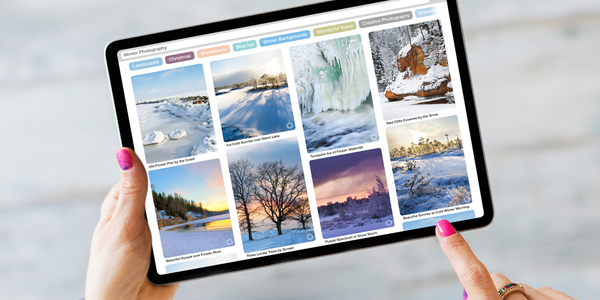
Pinterest may bring fresh opportunities to businesses looking to expand their potential audiences and help display a more visual side to the brand that other Social Media platforms may limit. Pinterest is one of the more casual marketing platforms, and so brands will be able to express their creativity and allow their personalities to shine through.
Getting Started On Pinterest
Businesses can create free pins on Pinterest with formats such as Images, Videos and Product Pins.
1. Create A Pinterest Profile
Pinterest profiles contain a profile picture and location as well as additional details to support in connecting with audiences.
2. Upgrade To A Business Account
Businesses should upgrade their profile to a Business Account. Similar to Instagram, this will allow for analytics and additional features.
3. Claim Your Sites
Businesses will need to ‘Claim’ their website and any third-party sites such as Etsy or Social Media accounts. By claiming sites, this will enable the businesses name and profile picture to appear on each Pin containing their content.
4. Create Pins
To promote products, share information and drive traffic to their website, businesses should create Pins.
5. Run Pinterest Ads
Finally, if there is an available marketing budget, businesses should consider running Pinterest Ads. Ads should be based on popular Pins and can be used to increase reach and awareness.
There are three types of Pins on Pinterest: Standard Pins, Video Pins and Story Pins.
Standard Pins
Standard Pinterest Pins can be uploaded by businesses, ideally high-quality and vertical images, to promote products or services to Pinterest users.
Businesses can add text overlay and a logo to their images to clarify who is promoting the products. Pin copy should be optimised with clear titles and descriptions to help be discovered in the search bar (think Pinterest SEO). Titles can be up to 100 characters, and the description can be up to 500 characters.

Video Pins
Although people don’t necessarily associate videos with Pinterest, users watch almost one billion a day on the platform. Pinterest recommends videos to be 6-15 seconds for an Ad and above 4 seconds for Organic with a solid start to catch viewers’ attention.
Users may watch videos with the sound off, as we know they do on other Social Media platforms, and so businesses should add text overlay or captions to promote the message. Similar to pins, Videos can have fully optimised titles and descriptions.
Story Pins
Story Pins on Pinterest are multi-page canvases used to – you guessed it – tell a story. This style of Pin can help brands to share their personality and drive engagement with their audience. Interesting or helpful Pins will give users a reason to follow businesses and keep engaging with their content.
The best way to monitor any return on Pinterest activity is to review Pin statistics. Businesses can select ‘Create’ below their profile name, then select ‘Pin Stats’ on each Pin. At the top right of the screen, Businesses can choose ‘See More Stats’ for additional insights.
Maximising Your Pinterest Opportunities
Businesses can maximise their opportunities by using the platform for what it’s intended: Visual Discovery. As with all other Social Media platforms, Pinterest is an extension of your brand, and therefore your boards should reflect your vision.
Whether you see your brand as ‘creative’ or not, you’ve created a product. Users are actively looking for the next new thing, from trend to inspiration, on Pinterest, so put your business out there.
Utilise the platform to share with the world what your business is all about, using images and videos. Engage with your audience and encourage them to engage back by commenting or reacting to your Pins and sharing their own versions.
Similar to other Social Media content strategies, Businesses should Pin consistently to increase their opportunities to reach target audiences.
All content must be visually striking to encourage that ‘thumb stopping’ moment. Competitors will likely also be sharing pins, so how can your brand stand out?
Unsurprisingly, 6x more businesses utilised shopping Ads on Pinterest in 2020, a time when the world stayed at home and shopped online. This shows that brands are already turning to Pinterest to reach their target audiences, and you should be too.
If you need some advice on Pinterest for your business speak to a social media consultant.

How To Use Twitter Advanced Search
Twitter Advanced Search Twitter Advanced Search...

How to Delete a Facebook Group
What is a Facebook Group? A Facebook Group is a...